Network & Project Management (Pre-Installation)
Network Requirements
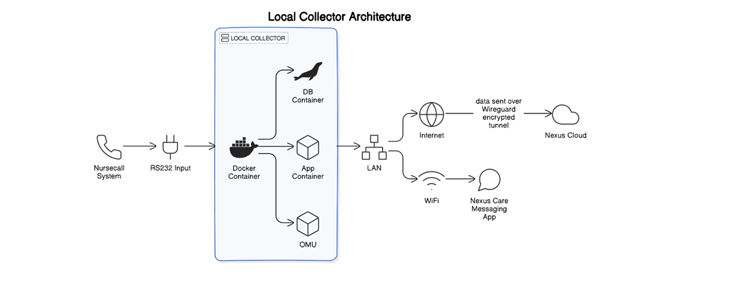
It’s essential to configure your collector device properly for seamless communication within your LAN and beyond. Let’s break down the network requirements for the collector device:
-
Collector Deployment Considerations:
- The collector device must have a local/internal static IP address, local subnet & local gateway which ensures consistent communication to the local IT network and a host device for the mobile application.
-
Outbound WAN Rules (Collector Connecting to the Internet):
- In general we recommend allowing all traffic outbound for the collector, however the following ports at minimum must be opened for outbound communication:
- Port 51820 (TCP/UDP): Used by WireGuard VPN.
- Port 53: DNS
- Port 80: API calls to our platform
- Port 443: API calls to our platform.
- Port 5050: Downloading Docker updates
- In general we recommend allowing all traffic outbound for the collector, however the following ports at minimum must be opened for outbound communication:
- Inbound WAN Rules (Internet sources connecting to the collector)
- We do not require any inbound rules or communication to the unit, it should not be internet accessible. Instead, our unit opens a wireguard tunnel outbound to us and we do all communication over this tunnel.
-
Internal LAN Rules (Handsets Accessing the Collector):
- Handsets using the mobile app should have unrestricted access via the LAN to the collector on the following ports:
- Port 80 (TCP): HTTP for local communication.
- Port 5557 (TCP): Local app socket communication
- Port 5559 (TCP): Local app socket communication
- Port 8083 (TCP): Local app socket communication
- Handsets using the mobile app should have unrestricted access via the LAN to the collector on the following ports:
There are some ranges used for internal communication within the collector, and for communication to the Wireguard network we operate. You must avoid using the following ranges:
-
Onsite Config Network:
- Network Range: 192.168.150.0/24
- Purpose: Used for onsite local configuration & initial set-up. (Engineer Use Only)
- Ensure that other devices or networks do not overlap with this range.
-
Wireguard VPN Network: Creates a tunnel between the cloud site and local collector.
- Network Range: 10.8.0.0/22
- Purpose: Used for Wireguard VPN connections via the local collector to the cloud servers, transports all nurse call data to cloud servers and allows management to the local collector and assists with OTA upgrades & system patching.
- Prevent any IP address conflicts with this range.
-
Docker Network:
- Network Range: 172.17.0.0/16
- Purpose: Used by Docker containers. Simplifies deployment and OTA upgrades.
- Be cautious not to use IP addresses within this range elsewhere.
By default all traffic that is not destined for the local network of the collector is routed via the wireguard tunnel. This means if you operate your handsets on a different network range or if you operate multiple ranges you will see some handsets fail to communicate with the collector. In this instance please provide the following information to our support team and we will be able to add the necessary routes to our collector
- IP Range
- Subnet Mask
- Gateway IP (must be within the local subnet the collector communicates using)
Project Requirements
Please provide the following information:
-
Nurse-Call System Details:
- Model of Nurse-Call System: [Enter Model Name/Number]
- Nursecall Maintainer Details & Support Contact: [Provide Contact Information]
-
Nurse-Call Paging Port Configuration:
- Request Paging Port Enablement: [Yes/No]
- Demonstration of Paging Port Functionality: [NC Provider has checked and confirms output if data is successful] [Yes/No]
- Licensing Applied: [Paging Licence has been added]
-
Network Infrastructure:
- Data Cable Between IT Network and Nurse-Call System: [Yes/No]
- Electrical Socket for Collector Unit: [Yes/No]
-
Mobile Devices:
- Make, Model, and Android Version of Mobile Devices: [Specify Details]
- Supplier of Mobile Devices: [Provide Supplier Information]
- Mobile Device Management: [Yes/No]
-
Call Point Names:
- List of Call Point Names (CSV): [Attach CSV File with Floor/Zone Information]
-
User Access:
- Users Signing In to Nexus App, Provide Full Names: [Attach CSV File with User Details]
- Management Users for Admin & Reporting Portal, Provide Email Addresses & Full Names: [Specify User Roles]
-
Zones/Wings:
- List of Zone/Wing Names: [Specify Zone/Wing Names]
-
Photos:
- Photos of Home, Nurse-Call System, IT Cabinets, etc.
-
IT Requirements:
- Outbound Firewall Rule Requirements: Click on Link: Network Requirements
- Static IP, Subnet, and Gateway Request: [Specify Request Details]
-
Wi-Fi Details:
- Wi-Fi Network Details for Mobile Devices: [Provide Wi-Fi Name & Password]