Rooms Management
Let’s explore the features of room management in more detail:
-
Edit Callpoint or Room Name:
- With room management, you can easily edit the callpoint (a unique identifier for a specific location) or the room name.
- Editing a Room Name will change the name display to the mobile app.
-
Grouping Rooms for Simplified Reporting:
- Room management lets you group callpoints under one room.
- By doing so, you simplify reporting by having one report for a resident.
-
Creating Callpoints and Match Strings:
- When you manually add a room, you only create the room but not the match string or callpoint you can simultaneously create a callpoint and a match string.
- When you manually add a room, you only create the room but not the match string or callpoint you can simultaneously create a callpoint and a match string.
Group Callpoints to a Room
-
When configuring your callpoints, you can group them within a specific room for streamlined reporting. Let’s walk through an example:
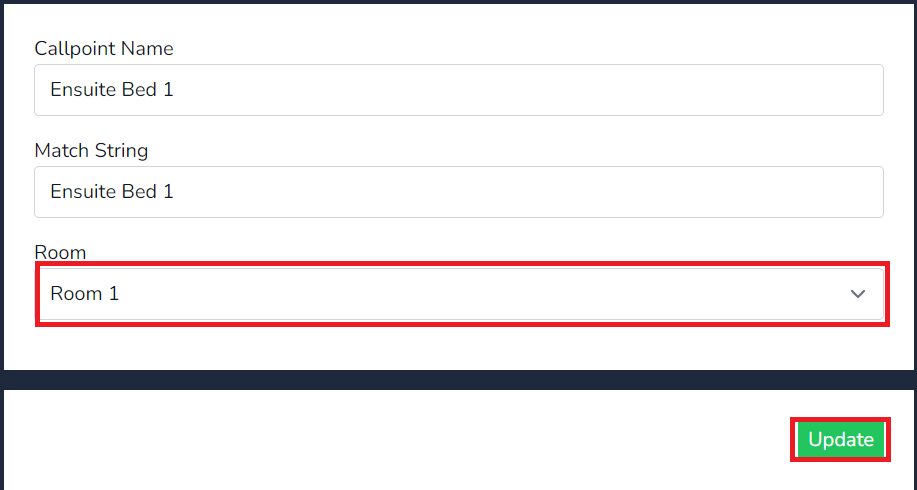
- Imagine you have an Ensuite Bed 1 callpoint.
- Select Manage against Ensuite Bed 1
- Select Manage under the room field
- In the dropdown menu, select Room 1 to associate Ensuite Bed 1 callpoint with the Room named Room 1
- When you generate reports, all callpoint data grouped with Room 1 will be consolidated for easy resident reporting.